Tape Measure: Measuring Ruler
- 4.2
- Rating
- 10.00M
- Installs
- Free
- Price
 Analysis by App-foxy
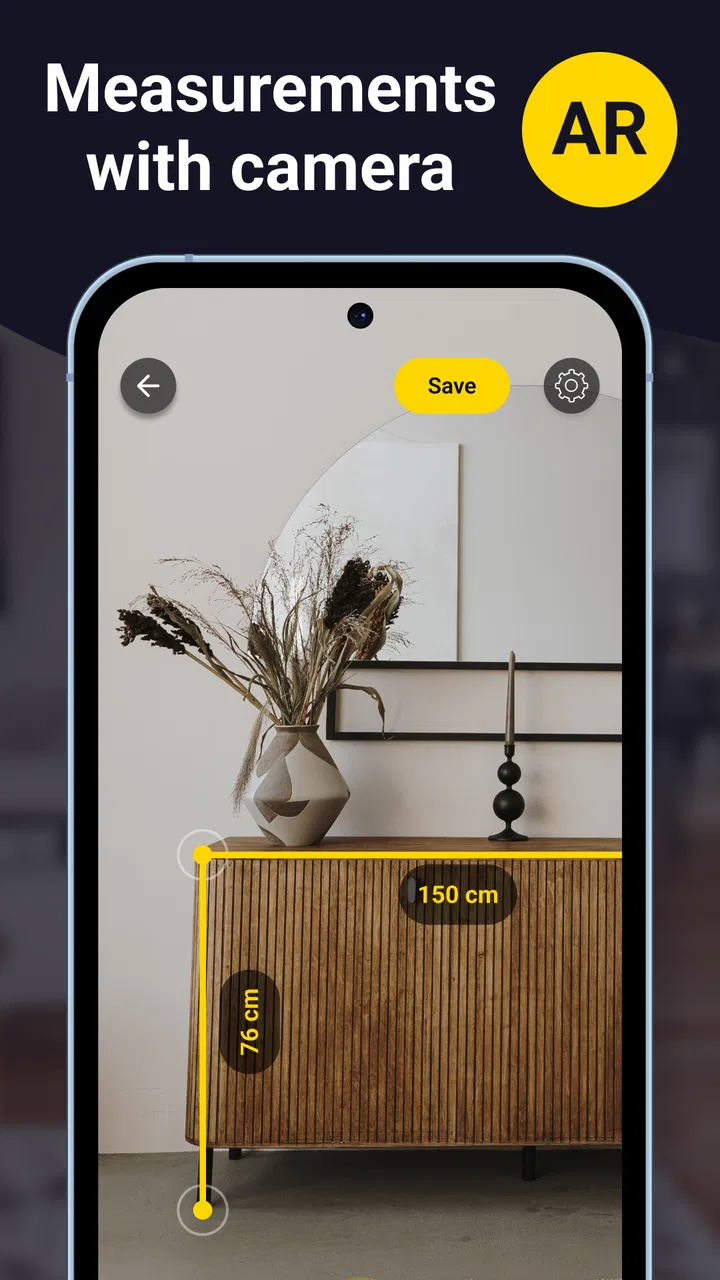
I like having a measuring tool available when I need a quick estimate, but I do not always want to carry a tape measure around. Tape Measure: Measuring Ruler takes the practical idea of measuring from a photo and puts it into a free Android app from Grymala apps. In my experience, it is most useful when I need a convenient approximation for a room, piece of furniture, or everyday object rather than the precision of a professional measuring instrument.
The app belongs to the Tools category and is aimed at a very broad audience. Its Everyone age rating makes sense because the basic purpose is simple: use a phone as a visual measuring aid. It has been available since March 27, 2013, and the current version is 6.5.3. That long presence, together with an average rating of 4.2 from around 270 thousand ratings and more than 10 million installs, suggests that the concept has proved useful to a large number of phone owners.
My short version is this: I would keep it for quick planning, rough comparisons, and situations where a physical ruler is unavailable. I would not use it as the final authority for cutting materials, checking a doorway before delivery, or settling any measurement where a small error could become expensive.
You May Also Like

 Blood Strike: 2.5 Anniversary
Blood Strike’s Loadouts Turn Every Drop Into a Tactical Gamble
A close look at Blood Strike’s custom loadouts: how fast access to signature weapons reshapes its battle royale rhythm, rewards preparation, and narrows the gap between fights.

 Pandora - Music & Podcasts
Pandora’s Music Is Easy to Start, but Harder to Recover
Pandora’s strength is its low-effort path from a seed to a station. Its weak spot is how much confidence it asks you to place in connection, setup, and quiet recovery.

 8 Ball Pool
 Is Built on Rivalries, Rematches, and Routine
A close look at the rivalries, rematches, shared routines, and unanswered safety questions that turn a quick pool match into a persistent mobile community.

 Samsung Music
’s Quiet Strength Is Playing What You Already Own
Its reach comes less from spectacle than from dependable access to a personal library. That simplicity is both the app’s strongest retention engine and its ceiling.

 AccuWeather: Weather Radar
AccuWeather Review: A Quick, Clear Forecast for Everyday Decisions
For everyday plans, the best forecast is the one you can understand quickly. AccuWeather makes rain timing, radar, and local conditions easy to act on, with a few trade-offs.

 Hill Climb Racing
Why Hill Climb Racing Still Turns Crashes Into One More Run
A tiny car, a bumpy hill and one more upgrade: Hill Climb Racing keeps resurfacing because its simple chaos makes every near-miss feel personal.
More From Our News Desk



How the free access affects its value
The app itself is free to install, which makes trying it relatively easy. That matters for a tool like this because usefulness depends heavily on your phone, lighting, camera angle, and the kind of object you want to measure. You can test it with something familiar before deciding whether it deserves a permanent place on your device.
There are in-app purchases ranging from $0.99 to $89.99 per item. I would therefore separate the free experience from any paid value rather than treating the app as automatically free in every respect. The sensible approach is to begin with the basic access, see whether its measurements are reliable enough for your routine, and only then consider whether an optional purchase solves a problem you actually have.
That price range deserves attention because a measurement app is not equally valuable to everyone. Someone who needs an occasional estimate may find the free access sufficient. A person using it repeatedly for work should compare the cost of any desired purchase with a physical tape measure, a dedicated laser tool, or a more specialized measurement solution. The app is convenient, but convenience alone does not guarantee that a paid option is good value.
I also appreciate that the free starting point lowers the risk of a bad buying decision. Rather than paying before discovering that your phone produces inconsistent results, you can first try familiar objects and compare the app’s estimates with a real ruler. That simple test tells you more than a store description can.
What the app is trying to replace
A normal tape measure remains the better choice when you need dependable physical contact with an object. It does not care whether the surface is glossy, whether the room is dim, or whether the camera is held at a slight angle. A laser measure is usually a stronger alternative for longer distances and repeatable room work, while a standard ruler is better for small objects that can be placed directly beside a known scale.
This app competes on availability rather than absolute accuracy. Your phone is already in your hand, and a photo-based approach can be faster than searching for a tool. That is a real advantage in a furniture shop, during a house visit, or while checking whether an item looks likely to fit. The trade-off is that the phone must interpret visual information, so the result should be treated as an estimate unless you have carefully checked it.
Where the app delivers practical value
The strongest use case is early-stage planning. Imagine that I am rearranging a bedroom and wondering whether a narrow cabinet will fit beside a desk. I can use the app to get a quick idea of the available space, compare that estimate with the cabinet’s listed dimensions, and decide whether it is worth taking a proper tape measure into the room. That saves time without pretending that the phone has replaced a professional tool.
It can also help when shopping for furniture. If I am standing in a showroom and want to compare the depth of two pieces, a phone-based estimate may be enough to identify the obvious mismatch. I would still verify the final choice at home, but the app can reduce guesswork while I am making an initial decision.
Another useful situation is documenting an object for a conversation. If I need to explain the approximate size of a table, picture frame, package, or wall section to someone who is not present, a photo with a measurement can communicate scale more clearly than words alone. The value here is not laboratory precision; it is giving another person a practical visual reference.
For renters and homeowners, rough room measurements can support planning before a more careful measurement session. I might use it to think about where a shelf could go, estimate the width of a wall for a decorating idea, or compare the apparent size of two spaces. Used this way, the app is a planning companion rather than a construction instrument.
There is also a useful workflow for avoiding false confidence. I would measure the same object from more than one angle, write down the approximate results, and look for a consistent range instead of trusting the first number shown. If the estimates vary noticeably, that is a warning to switch to a physical tool. This habit is more valuable than simply pressing the measurement button and accepting whatever appears.
Small details that improve the workflow
Before measuring, I would clear unnecessary objects from the area and make sure the endpoints are visually obvious. A cluttered scene makes it harder to identify where a measurement should begin and end. Placing a familiar object in the same scene can also provide a rough reality check, although it should not be treated as a substitute for calibration.
Lighting matters more than many new users expect. A bright, evenly lit surface is easier to interpret than a dark corner or a reflective tabletop. I would avoid measuring through strong shadows and would keep the phone as steady as possible. These are simple steps, but they make a phone-based tool less frustrating.
For a long wall, I would break the task into shorter sections and compare the combined estimate with the room’s overall layout. A single large measurement can magnify camera-position errors. Shorter checks can reveal whether the result is stable enough for planning, especially when furniture or door frames provide clear reference points.
For small objects, I would place the item on a flat surface and photograph it from a sensible distance rather than holding the phone extremely close. Close-up perspective can make the ends harder to judge. I would also avoid using the result to cut, drill, or order a precisely sized replacement until I had confirmed it with a ruler or tape.
One non-obvious strength is that the app can be useful even when the measurement is only approximate, because it helps me decide what needs a second check. That triage role is easy to overlook. Instead of asking whether every result is perfect, I ask whether the result is good enough to guide the next action.
Trade-offs I noticed before trusting it
The central limitation is inherent in using a phone camera as a measuring aid: the result depends on how the scene is presented. Perspective, distance, lighting, surface texture, and unclear boundaries can all affect the estimate. This is not necessarily a flaw unique to Grymala apps; it is the unavoidable compromise behind the convenience.
I would be particularly cautious with irregular objects. A rounded cushion, curved lamp, soft bag, or object with an indistinct edge does not offer the same clean reference points as a rectangular box. Measuring a wall can also become awkward if the floor or ceiling line is partially hidden. In those cases, the app may still provide a rough impression, but the number should not be mistaken for a dependable specification.
The app is less suitable when mistakes have financial or safety consequences. I would not rely on it alone for ordering custom blinds, cutting countertop material, installing a door, checking a vehicle part, or confirming a gap for an appliance. A physical tape measure is inexpensive compared with the cost of correcting a wrong order, and a laser tool may be more appropriate for repeated room measurements.
There is also a learning curve in deciding how much confidence to place in a result. A clean number on the screen can feel more exact than the process deserves. My advice is to think in ranges: “roughly this wide” is often the honest conclusion. If you need a measurement accurate enough to distinguish between two very close options, use a conventional instrument.
The free model has another practical trade-off. It is easy to start without paying, but the presence of optional purchases means that users should inspect what an upgrade offers before spending money. I would not pay simply because I use the app occasionally. Paid value makes more sense only if the added access addresses a repeated limitation in your own workflow.
Device compatibility is also relevant. The app requires Android 8.0 or later, so it is not aimed at every older Android phone. On a compatible device, camera quality and general handling still influence the experience. Two people can install the same version and receive different practical results because their phones and surroundings are different.
When another option is clearly better
Choose a physical tape measure when you need a final dimension, especially for materials, furniture delivery, or installation. Choose a ruler when the object is small and accessible. Choose a laser measure when you regularly work across rooms or need repeatable distance readings. These alternatives are less convenient in some moments, but they provide a clearer basis for decisions where precision matters.
I would also skip this app if you dislike camera-based measuring in principle or if your main goal is professional documentation. The app is designed around quick visual measurement, not around replacing a complete surveying or construction workflow. Its best role is complementary: it helps you explore possibilities before you reach for more dependable equipment.
Who is most likely to get good value
This is a good fit for students, renters, decorators, casual DIY users, shoppers, and anyone who often needs a quick estimate while away from their toolbox. It is especially useful for people who want to check whether an idea is plausible before spending time finding a physical measuring device.
It can also suit someone moving between homes or offices. During an initial walkthrough, I could use it to create rough notes about wall sections, furniture spaces, or storage areas, then return later with a proper tape measure for the decisions that matter. That two-stage process keeps the phone useful without asking it to do more than it can reliably do.
People who should be cautious are contractors, installers, craftspeople, and users buying expensive items to fit a specific space. They may still appreciate the app for quick site notes, but it should not be their only measuring instrument. The more costly the consequence of an error, the less attractive the convenience trade-off becomes.
For families, the Everyone rating and straightforward purpose make it approachable, but I would still teach younger users that a displayed measurement is an estimate. That lesson is important because the app’s simplicity can hide the judgment needed to use it responsibly.
My buy-or-skip verdict
I would install Tape Measure: Measuring Ruler because the free entry point makes experimentation worthwhile, and the app fills a genuine gap when I need a fast estimate without a physical tool. Its long availability, current version 6.5.3, and broad adoption give it enough credibility to try, while the 4.2 average shows that it has been useful for many people without suggesting universal perfection.
I would not rush into an in-app purchase. First, I would test the free access on a few objects with known dimensions, use it in good lighting, and check whether its results are consistent on my phone. If it helps regularly with planning, an optional purchase may be worth considering, but I would judge that against the specific benefit it provides rather than the general promise of having a digital tape measure.
My final recommendation is simple: keep it as a convenient estimation tool, not as a replacement for measurement equipment. It earns its place when speed, portability, and rough visual guidance matter more than exactness. If you need a final number for building, buying, or fitting, spend the extra moment using a real tape measure or a more specialized device.
For the right user, that distinction makes the app genuinely helpful. It can turn a vague question—“Will this fit?”—into a quick, informed next step. For the wrong user, especially someone expecting professional precision from a phone camera, it will feel limiting. I recommend trying the free version, learning its boundaries, and paying only if its actual workflow repeatedly saves you time.
FAQs for Tape Measure: Measuring Ruler
01What is Tape Measure: Measuring Ruler used for?
Tape Measure: Measuring Ruler is designed to help you estimate the length, height, or distance of everyday objects using your smartphone. Depending on your device and the app’s available tools, measurements may be made with the camera, augmented reality, or on-screen ruler features. It can be useful for quick home projects, furniture checks, and general reference measurements, but it should not replace professional equipment.
02How accurate are the measurements in Tape Measure: Measuring Ruler?
The accuracy can vary considerably depending on your phone’s camera, motion sensors, lighting, surface texture, and the way you position the device. During practical use, the app is best for approximate measurements rather than exact technical work. For improved results, keep the phone steady, follow the calibration instructions, measure from clearly visible points, and confirm important dimensions with a physical tape measure or specialized tool.
03Does Tape Measure: Measuring Ruler require camera or other permissions?
If you use camera-based or augmented-reality measuring features, the application will normally request access to your device’s camera and possibly motion or sensor data. These permissions are needed to recognize surfaces and calculate distances. You can review or change access in your Android or iOS settings. If you deny camera access, some ruler or manual features may still work, although the app’s full measuring functionality could be limited.
04Can I use Tape Measure: Measuring Ruler without an internet connection?
Some basic measuring functions may work offline once the application is installed, especially tools that rely only on the screen ruler or previously downloaded components. However, certain features, advertisements, help content, updates, or augmented-reality services may require an internet connection. If you plan to use it at a construction site, store, or another location with weak coverage, test the functions beforehand and keep a traditional measuring tool available.
05Is Tape Measure: Measuring Ruler suitable for professional measurements?
Tape Measure: Measuring Ruler is more appropriate for casual and household tasks, such as checking whether furniture may fit, estimating wall dimensions, or comparing object sizes. Smartphone-based measurements can be affected by calibration and environmental conditions, so the results should not be used alone for construction, engineering, medical, legal, or other situations requiring certified precision. Always verify critical measurements with professional equipment before making decisions.
Pros
- Quickly measures objects using the phone’s camera
- Simple interface that is easy for first-time users
- Useful for checking approximate dimensions on the go
- No physical ruler is needed for basic measurements
- Convenient for furniture
- boxes
- and household items
Cons
- Accuracy can vary with lighting
- angles
- and camera quality
- Requires camera access to measure objects
- Some features may be locked behind ads or in-app purchases
- Small or irregular objects can be difficult to measure precisely
- Measurements may need calibration for more reliable results

Tape Measure: Measuring Ruler
Gallery